Java 网络编程
邮件:
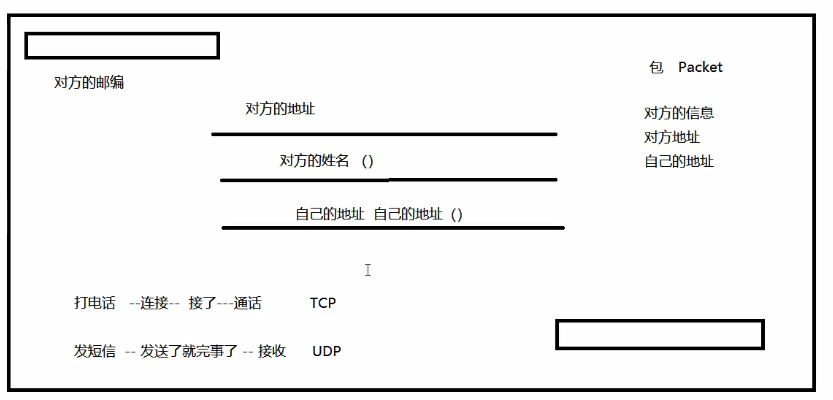
- 计算机网络: 计算机网络是指将地理位置不同的具有独立功能的多台计算机及其外部设备,通过通信线路连接起来,在网络操作系统,网络管理软件及网络通信协议的管理和协调下,实现资源共享和信息传递的计算机系统。
- 网络编程的目的:无线电台…传播交流信息,数据交换,通信。
- 想要达到这个效果需要什么:
- 如何让准确的定位网络上的一台主机 192.168.16.124:端口, 定位上这个计算机上的某个资源。
- 找到了这个主机,如何传输数据呢?
- Javaweb:网页编程 、 B/S架构
- 网络编程:TCP/IP 、 C/S
2.网络通信要素
Section titled “2.网络通信要素”如何实现网络的通信?
- 通信双方的地址:
- ip:192.168.16.124
- 端口:5900
- 规则:网络通信的协议:TCP/IP
小结:
- 网络编程中有两个主要的问题:
- 如何让准确的定位到网络上的一台或多台主机;
- 找到主机之后如何通信;
- 网络编程中的要素:
- IP和端口号:IP
- 网络通信协议:UDP、TCP
- 万物皆对象
IP 地址:InetAddress
-
唯一定位一台网络上的计算机
-
127.0.0.1: 本机localhost
-
ip地址的父类
- ==IPV4==: 127.0.0.1 ,4个字节组成。,0
255, 42亿;30亿都在北美,亚洲4亿。2011年就用尽; - ==IPV6==: fe80::f0e0:7383:ad8e:f32f%3 ,128位。8个无符号整数
2406:da18:ddf:4000:67d5:b226:cad7:125b - ==IPV4==: 127.0.0.1 ,4个字节组成。,0
-
公网(互联网)–私网(局域网)
-
192.168.xx.xx,专门给组织内部使用。
-
域名:记忆IP问题!
- IP:www.vip.com
package github.Web;
import java.net.InetAddress;import java.net.UnknownHostException;
/** * @author subeiLY * @create 2021-06-06 10:09 */public class TestInetAddress {    public static void main(String[] args) {        try{            // 查询本机地址            InetAddress inetAddress1 = InetAddress.getByName("127.0.0.1");            System.out.println(inetAddress1);            InetAddress inetAddress2 = InetAddress.getByName("localhost");            System.out.println(inetAddress2);            InetAddress inetAddress3 = InetAddress.getLocalHost();            System.out.println(inetAddress3);
            // 查询网站IP地址            InetAddress inetAddress = InetAddress.getByName("www.taobao.com");            System.out.println(inetAddress);
            // 常用方法//            System.out.println(inetAddress.getAddress());   // 返回的是一个字节数组  无用            System.out.println(inetAddress.getCanonicalHostName());    // 规范的名字            System.out.println(inetAddress.getHostAddress());  // IP            System.out.println(inetAddress.getHostName()); // 域名,或者自己电脑的名字
        }catch (UnknownHostException e) {            e.printStackTrace();        }
}}-
端口表示计算机上一个程序的进程;
-
不同的进程有不同的端口号!用来区分软件!
-
被规定0~65535
-
TCP,UDP:65535*2个端口 tcp:80 udp:80 单个协议下,端口号不能冲突
-
端口分类
- 共有端口 0~1023 内置的进程使用
- HTTP:80
- HTTP:443 如访问https://www.baidu.com:443 访问的还是百度
- FTP:21
- TELENT:23
- 程序注册端口:1014-49151,分配给用户和程序
- Tomcat:8080
- MySql:3306
- Oracle:1521
- 动态、私有端口:49152~65535
- 共有端口 0~1023 内置的进程使用
netstat -ano #查看所有的端口netstat -nao|findstr "7808" #查看指定的端口tasklist|findstr "8696"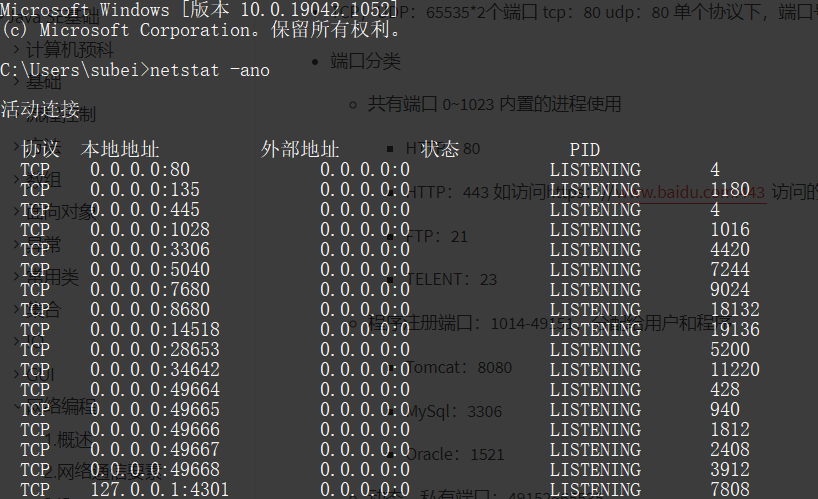
package github.Web;
import java.net.InetSocketAddress;
/** * @author subeiLY * @create 2021-06-06 10:34 */public class TestInetSocketAddress {    public static void main(String[] args) {        InetSocketAddress socketAddress = new InetSocketAddress("127.0.0.1", 8080);        InetSocketAddress socketAddress2 = new InetSocketAddress("localhost", 8080);        System.out.println(socketAddress);        System.out.println(socketAddress2);
        System.out.println(socketAddress.getAddress());        System.out.println(socketAddress.getHostName());    // 地址        System.out.println(socketAddress.getPort());    // 端口    }}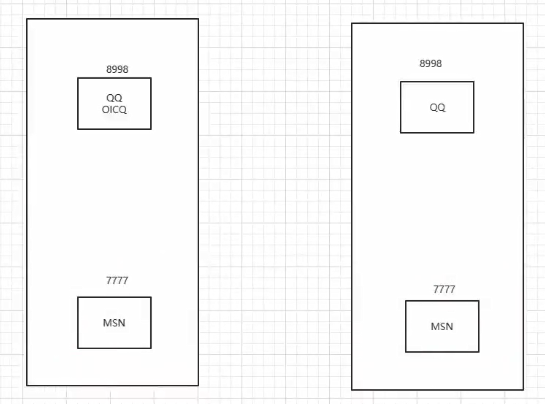
5.通信协议
Section titled “5.通信协议”协议:约定,就好比中国人交流说的是普通话
网络通信协议: 速率,传输码率,代码结构,传输控制…
问题:非常的复杂
大事化小:分层
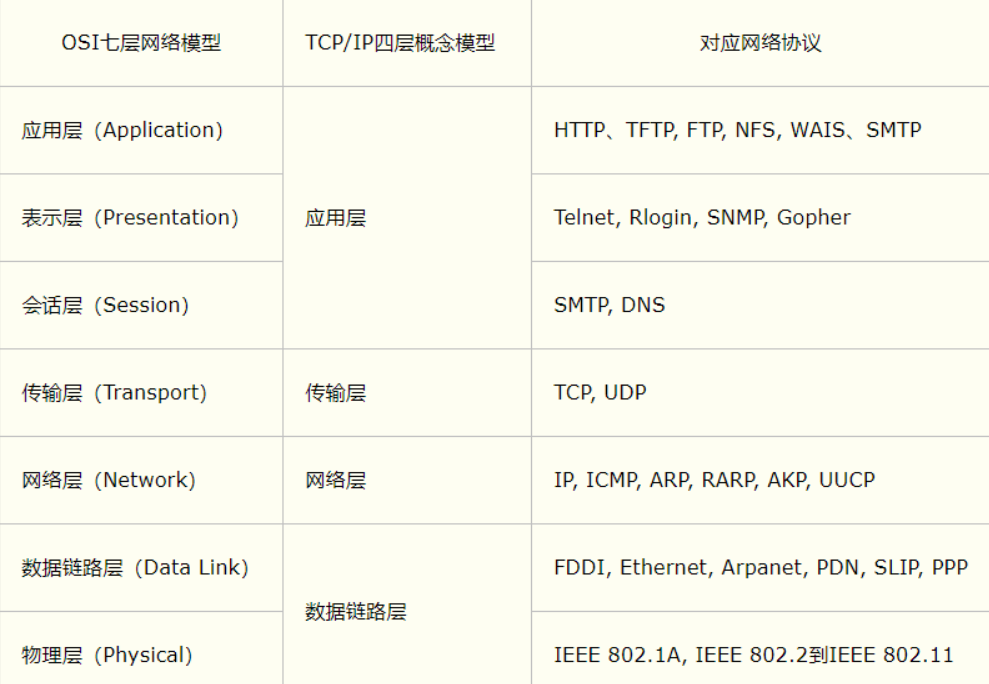
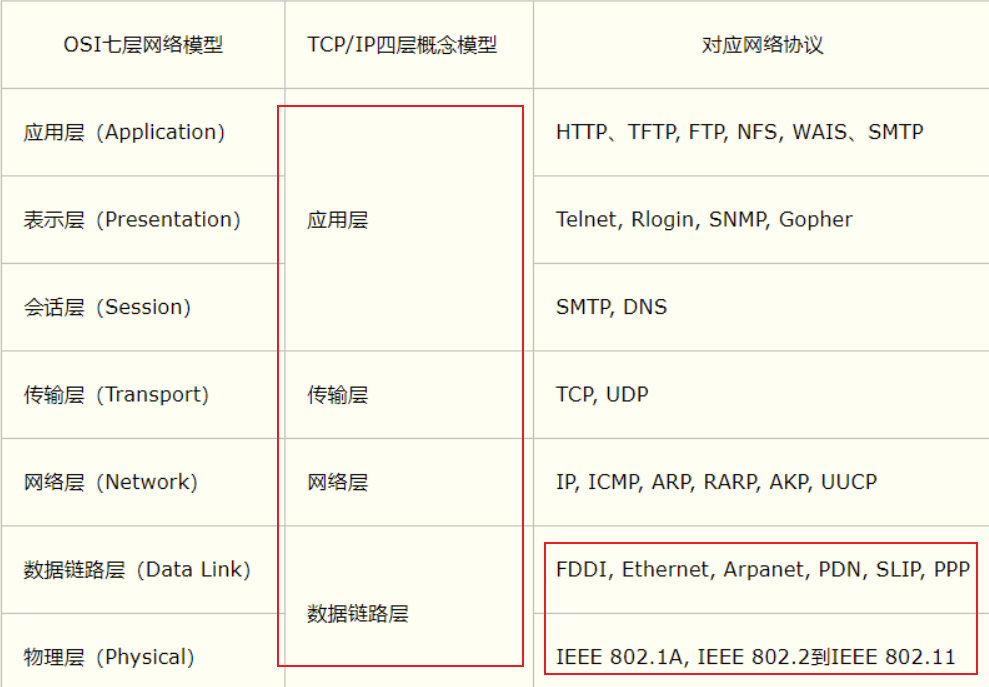
TCP/IP协议簇:实际上是一组协议
重要:
- TCP:用户传输协议
- UDP:用户数据报协议
出名的协议:
- TCP:
- IP:网络互联协议
TCP UDP 对比
-
TCP:打电话
-
连接,稳定
-
三次握手,四次挥手
最少需要三次,保证稳定连接!A:你瞅啥?B:瞅你咋地?A:干一场A:我要分手了B:我知道你要分手了B:你真的要分手吗?A:我真的要分手了 -
客户端、服务器
-
传输完成,释放连接,效率低
-
-
UDP;发短信
- 不连接,不稳定
- 客户端、服务端:没有明确的解现
- 不管有没有准备好,都可以发给你
- DDOS:洪水攻击! 发垃圾包 堵塞线路 (饱和攻击)
先启动服务端,再启动客户端!!!!
客户端
- 连接服务器 Socket
- 发送消息
package github.Web.Demo02;
import java.io.IOException;import java.io.OutputStream;import java.net.InetAddress;import java.net.Socket;
/** * @author subeiLY * @create 2021-06-06 11:08 */// 客户端public class TCPClientDemo01 {    public static void main(String[] args) {        Socket accept = null;        OutputStream os = null;
        try {            // 1.要知道服务器的地址            InetAddress inetAddress = InetAddress.getByName("127.0.0.1");            int port = 9999;            // 2.创建一个socket链接            accept = new Socket(inetAddress,port);            // 3.发送信息IO流            os = accept.getOutputStream();            os.write("就这吧,什么鬼?".getBytes());        }catch (Exception e){            e.printStackTrace();        } finally {            // 关闭资源            if(os != null){                try {                    os.close();                } catch (IOException e) {                    e.printStackTrace();                }            }            if(accept != null){                try {                    accept.close();                } catch (IOException e) {                    e.printStackTrace();                }            }        }    }}
服务器端
- 建立服务的端口 ServerSocket
- 等待的用户的连接 accept
- 接收用户的消息
package github.Web.Demo02;
import java.io.ByteArrayOutputStream;import java.io.IOException;import java.io.InputStream;import java.net.ServerSocket;import java.net.Socket;
/** * @author subeiLY * @create 2021-06-06 11:22 */// 服务端public class TCPServerDemo01 {    public static void main(String[] args) {
        ServerSocket serverSocket = null;        Socket socket = null;        InputStream is = null;        ByteArrayOutputStream baos = null;
        try{            // 1.有一个地址            serverSocket = new ServerSocket(9999);            // 2.等待客户端连接过来            socket = serverSocket.accept();            // 3.读取客户端的消息            is = socket.getInputStream();
           /*           //弃用 会有中文乱码           byte[] buffer = new byte[1024];            int len = 0;            while ((len = is.read(bytes)) != -1){                String s = new String(buffer,0,len);                System.out.println(s);            }            */
            // 管道流            baos = new ByteArrayOutputStream();
            byte[] buffer = new byte[1024];            int len = 0;            while ((len = is.read(buffer)) != -1) {                baos.write(buffer, 0, len);            }            System.out.println(baos.toString());
        } catch (IOException e) {            e.printStackTrace();        } finally {            // 关闭资源            if (baos != null) {                try {                    baos.close();                } catch (IOException e) {                    e.printStackTrace();                }            }            if (is != null) {                try {                    is.close();                } catch (IOException e) {                    e.printStackTrace();                }            }            if (socket != null) {                try {                    socket.close();                } catch (IOException e) {                    e.printStackTrace();                }            }            if (serverSocket != null) {                try {                    serverSocket.close();                } catch (IOException e) {                    e.printStackTrace();                }            }        }    }}
1.文件上传
Section titled “1.文件上传”- 客户端
package github.Web.Demo02;
import java.io.*;import java.net.InetAddress;import java.net.Socket;
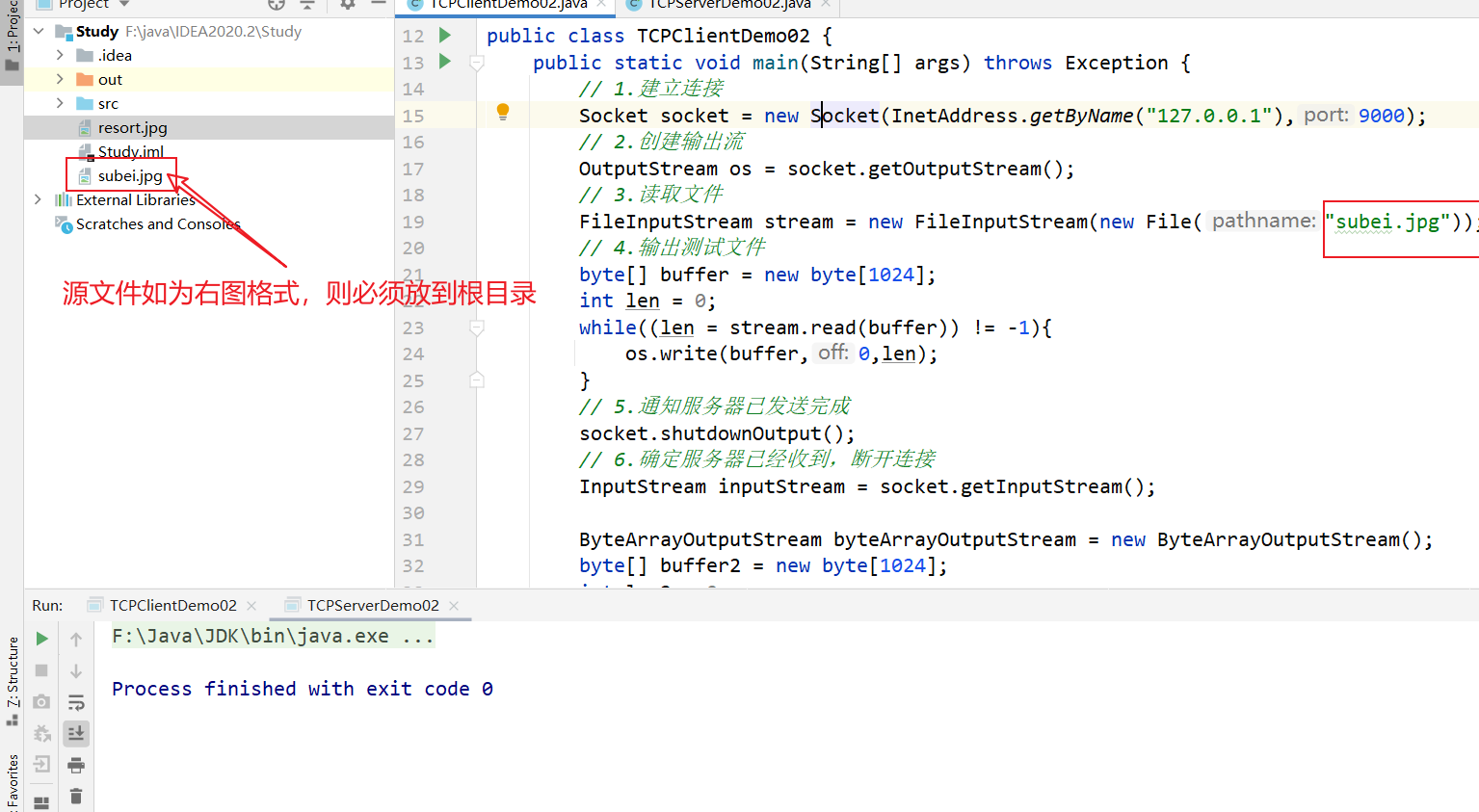
/** * @author subeiLY * @create 2021-06-06 13:13 */// 客户端public class TCPClientDemo02 {    public static void main(String[] args) throws Exception {        // 1.建立连接        Socket socket = new Socket(InetAddress.getByName("127.0.0.1"),9000);        // 2.创建输出流        OutputStream os = socket.getOutputStream();        // 3.读取文件        FileInputStream stream = new FileInputStream(new File("subei.jpg"));        // 4.输出测试文件        byte[] buffer = new byte[1024];        int len = 0;        while((len = stream.read(buffer)) != -1){            os.write(buffer,0,len);        }        // 5.通知服务器已发送完成        socket.shutdownOutput();        // 6.确定服务器已经收到,断开连接        InputStream inputStream = socket.getInputStream();
        ByteArrayOutputStream byteArrayOutputStream = new ByteArrayOutputStream();        byte[] buffer2 = new byte[1024];        int len2 = 0;        while((len2 = stream.read(buffer2)) != -1){            byteArrayOutputStream.write(buffer2,0,len2);        }
        System.out.println(byteArrayOutputStream);
        // 7.关闭流        byteArrayOutputStream.close();        inputStream.close();        stream.close();        os.close();        socket.close();
}}- 服务端
package github.Web.Demo02;
import java.io.FileOutputStream;import java.io.InputStream;import java.io.OutputStream;import java.net.ServerSocket;import java.net.Socket;
/** * @author subeiLY * @create 2021-06-06 13:13 */// 服务器public class TCPServerDemo02 {    public static void main(String[] args) throws Exception{        // 1.创建一个服务器地址        ServerSocket socket = new ServerSocket(9000);        // 2.监听客户连接        Socket accept = socket.accept();    // 阻塞式监听,能等待用户连进来        // 3.获取输入流        InputStream is = accept.getInputStream();        // 4.确定存放文件的位置        FileOutputStream fileOutputStream = new FileOutputStream("resort.jpg");
        // 5.写入文件        byte[] buffer = new byte[1024];        int len = 0;        while((len = is.read(buffer)) != -1){            fileOutputStream.write(buffer,0,len);        }
        // 6.通知客户端收集完毕        OutputStream outputStream = accept.getOutputStream();        outputStream.write("服务器已经收集成功,请断开连接!".getBytes());
        // 7.关闭流        outputStream.close();        fileOutputStream.close();        is.close();        accept.close();        socket.close();
    }}
2.初识Tomcat
Section titled “2.初识Tomcat”Tomcat
Section titled “Tomcat”Tomcat乱码: conf\logging.properties 把UTF-8改为GBK
服务端
- 自定义 S
- Tomcat服务器 S :Java后台开发
客户端
- 自定义 C
- 浏览器 B
发短信:不用连接,需要知道对方的地址
1.发送消息
Section titled “1.发送消息”package github.Web.Demo03;
import java.net.DatagramPacket;import java.net.DatagramSocket;import java.net.InetAddress;
/** * @author subeiLY * @create 2021-06-06 13:25 */// 不需要连接服务器public class UDPClientDemo01 { public static void main(String[] args) throws Exception{ // 1.建立一个Socket DatagramSocket socket = new DatagramSocket(); // 2.建个包 String msg = "服务器,你好!"; InetAddress localhost = InetAddress.getByName("localhost"); int port = 9090;
// 数据,数据的长度起始,要发送给谁 DatagramPacket packet = new DatagramPacket(msg.getBytes(), 0,msg.getBytes().length,localhost,port);
// 3.发送包 socket.send(packet);
// 4.关闭流 socket.close();
}}package github.Web.Demo03;
import java.net.DatagramPacket;import java.net.DatagramSocket;
/** * @author subeiLY * @create 2021-06-06 13:26 */// 还是需要客户端的链接public class UDPServerDemo01 { public static void main(String[] args) throws Exception{ // 1.开放端口 DatagramSocket socket = new DatagramSocket(9090); // 2.接收数据包 byte[] buffer = new byte[1024]; DatagramPacket packet = new DatagramPacket(buffer, 0, buffer.length);
socket.receive(packet); // 阻塞接受 System.out.println(packet.getAddress().getHostAddress()); System.out.println(new String(packet.getData())); // 3.关闭连接 socket.close();
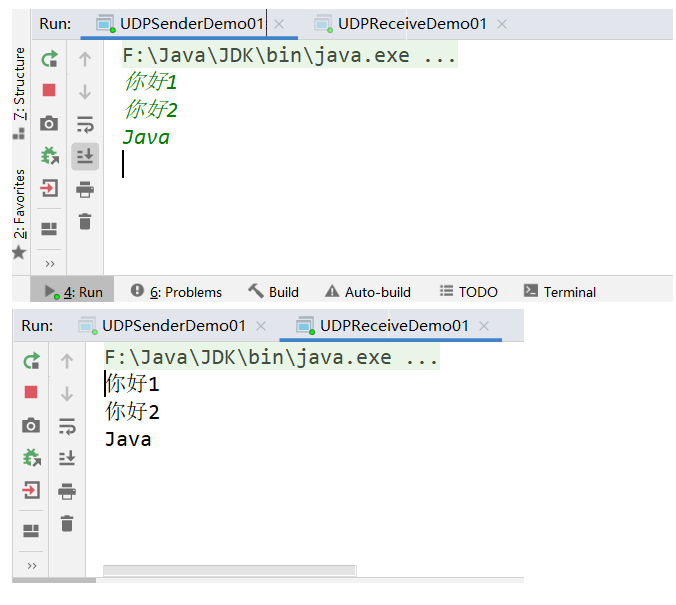
}}2.循环发送消息
Section titled “2.循环发送消息”package github.Web.Demo03;
import java.io.BufferedReader;import java.io.InputStreamReader;import java.net.DatagramPacket;import java.net.DatagramSocket;import java.net.InetSocketAddress;
/** * @author subeiLY * @create 2021-06-06 14:06 */public class UDPSenderDemo01 { public static void main(String[] args) throws Exception{ DatagramSocket socket = new DatagramSocket(8888);
// 准备数据:控制台读取 BufferedReader reader = new BufferedReader(new InputStreamReader(System.in));
while(true) { String data = reader.readLine(); byte[] buffer = data.getBytes(); DatagramPacket packet = new DatagramPacket(buffer, 0, buffer.length, new InetSocketAddress("localhost", 9090));
// 发送包 socket.send(packet); if (data.equals("bye")) { break; } }
// 关闭socket socket.close();
}}package github.Web.Demo03;
import java.net.DatagramPacket;import java.net.DatagramSocket;
/** * @author subeiLY * @create 2021-06-06 14:06 */public class UDPReceiveDemo01 { public static void main(String[] args) throws Exception{ // 开放端口 DatagramSocket socket = new DatagramSocket(6666);
while (true) {
// 准备接收包裹 byte[] container = new byte[1024]; DatagramPacket packet = new DatagramPacket(container, 0, container.length); socket.receive(packet);
byte[] data = packet.getData(); String receiveData = new String(data); System.out.println(receiveData);
if (receiveData.equals("bye")) { break; } }
// 关闭socket socket.close();
}}
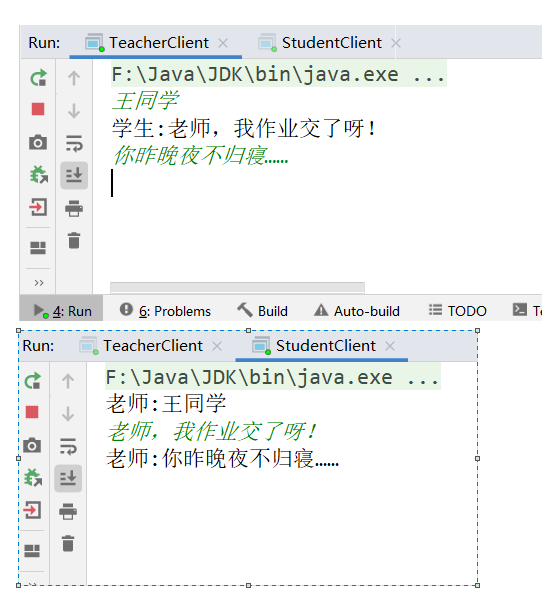
在线咨询: 两个人都可以是发送方,也可以是接收方(配合多线程)
- 发信端
package github.Web.Demo04;
import java.io.BufferedReader;import java.io.IOException;import java.io.InputStreamReader;import java.net.DatagramPacket;import java.net.DatagramSocket;import java.net.InetSocketAddress;import java.net.SocketException;
/** * @author subeiLY * @create 2021-06-06 14:22 */public class TalkSend implements Runnable {    DatagramSocket socket = null;    BufferedReader reader = null;
    private int    formPort;    private String hostname;    private int    toPort;
    public TalkSend(int formPort, String hostname, int toPort) {        this.formPort = formPort;        this.hostname = hostname;        this.toPort = toPort;
        try {            socket = new DatagramSocket(formPort);            reader = new BufferedReader(new InputStreamReader(System.in));        } catch (SocketException e) {            e.printStackTrace();        }    }
    @Override    public void run() {
        while (true) {            try {                String s = reader.readLine();                byte[] buffer = s.getBytes();                DatagramPacket packet = new DatagramPacket(buffer, 0, buffer.length,                        new InetSocketAddress(hostname, toPort));
                // 发送包                socket.send(packet);                if (s.equals("bye")) {                    break;                }            } catch (IOException e) {                e.printStackTrace();            }        }
// 关闭socket socket.close(); }}- 接收端
package github.Web.Demo04;
import java.io.IOException;import java.net.DatagramPacket;import java.net.DatagramSocket;import java.net.SocketException;
/** * @author subeiLY * @create 2021-06-06 14:22 */public class TalkReceive implements Runnable{    DatagramSocket socket = null;
    private int port;
    public TalkReceive(int port) {        this.port = port;        try {            socket =  new DatagramSocket(port);        } catch (SocketException e) {            e.printStackTrace();        }    }
    @Override    public void run() {        //开放端口
        // 接收包        while (true){            try {                byte[] container = new byte[1024];                DatagramPacket packet = new DatagramPacket(container,0,container.length);
                // 接收                socket.receive(packet);

                byte[] data = packet.getData();                String receiveData = new String(data);                System.out.println(Thread.currentThread().getName() + ":" + receiveData);

                if (receiveData.equals("bye")){                    break;                }            } catch (IOException e) {                e.printStackTrace();            }        }
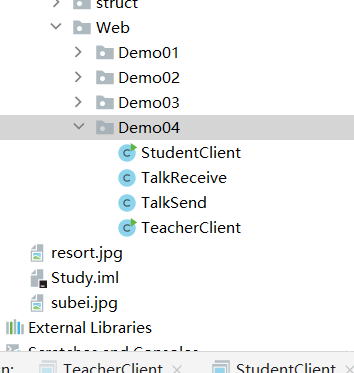
socket.close(); }}- 教师端
package github.Web.Demo04;
/** * @author subeiLY * @create 2021-06-11 18:23 */public class StudentClient {    public static void main(String[] args) {        new Thread(new TalkSend(7777,"localhost",8900)).start();        new Thread(new TalkReceive(9999),"老师").start();
}}- 学生端
package github.Web.Demo04;
/** * @author subeiLY * @create 2021-06-11 18:23 */public class TeacherClient {    public static void main(String[] args) {        new Thread(new TalkSend(5555,"localhost",9999)).start();        new Thread(new TalkReceive(8900),"学生").start();
    }}
-
统一资源定位符:定位互联网上的某一个资源
-
DNS域名解析 www.baidu.com —> xxx.xxx.xxxx.xxx…xxx
协议:// ip地址:端口号/项目名/资源package github.Web.Demo05;
import java.net.MalformedURLException;import java.net.URL;
/** * @author subeiLY * @create 2021-06-06 15:16 */public class URLDemo01 { public static void main(String[] args) throws MalformedURLException {
URL url = new URL("http://localhost:8080/helloworld/insex" + ".jsp?username=subeily&password=123");
System.out.println(url.getProtocol()); // 协议 System.out.println(url.getHost()); // 主机IP System.out.println(url.getPort()); // 端口 System.out.println(url.getPath()); // 路径 System.out.println(url.getFile()); // 文件名 System.out.println(url.getQuery()); // 参数
}}-
下载网页上的文件
- 1.启动tomcat服务器;
- 2.在tomcat中放好文件;
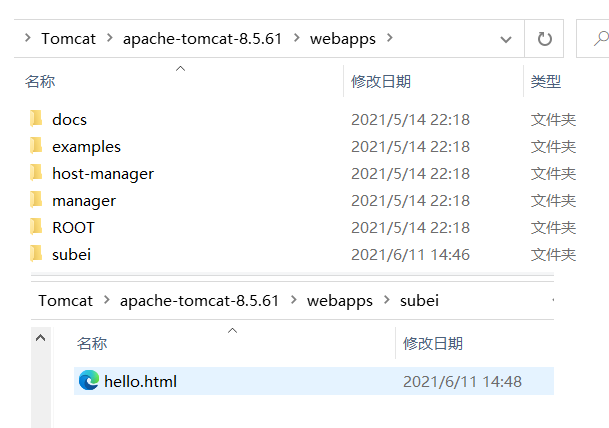
- 3.进行相关测试。
package github.Web.Demo05;
import java.io.File;import java.io.FileOutputStream;import java.io.InputStream;import java.net.HttpURLConnection;import java.net.URL;
/** * @author subeiLY * @create 2021-06-06 15:16 */public class URLDemo02 {    public static void main(String[] args) throws Exception{
        // 1.下载地址        URL url = new URL("http://localhost:8080/subei/hello.html");
        // 2.连接到这个资源 HTTP        HttpURLConnection urlConnection = (HttpURLConnection) url.openConnection();
        InputStream is = urlConnection.getInputStream();
        FileOutputStream stream = new FileOutputStream(new File("same.txt"));
        byte[] bytes = new byte[1024];        int len = 0;        while ((len = is.read(bytes)) != -1){            stream.write(bytes,0,len);        }
        stream.close();        is.close();        urlConnection.disconnect();
    }}